Collection Feature Box
What Does Collection Feature Box Do?
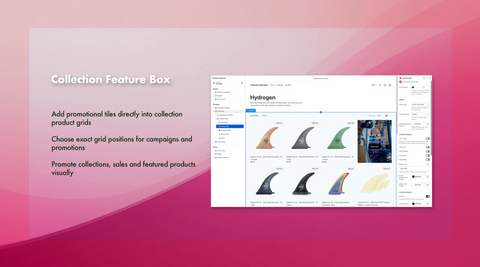
Turn collection pages into powerful merchandising tools. Add promotional content blocks directly into Shopify collection grids to highlight seasonal campaigns, sales, related collections and featured products. Choose where blocks appear to guide shoppers, improve product discovery and cross-promote collections without editing theme code. A simple way to make collection pages work harder for your store.
Get the Collection Feature Box app
Key features
- Add promotional tiles directly into collection product grids
- Choose exact grid positions for campaigns and promotions
- Promote collections, sales and featured products visually

How to Use Collection Feature Box
Once you have installed the app, there are just 3 steps needed:
1) Add the FEATURE BOX to the section in your collection templates.
Click ONLINE STORE > EDIT THEME - and from the top drop down (Home will be selected by fault) choose Collections.
Click on any Collections you want to use the feature boxes on.
Then on the left under TEMPLATE add a new Section and choose the FEATURE BOX app from the APP options.
By default the App will be set to display the feature box in position 4 but no boxes will display until a box is created and added to the collection.
Save the changed and click out of the theme editor.
2) Create a Feature Box to display
Click on the Feature box item on the left menu of the app - and then click the NEW FEATURE BOX button. You can now add the Title and Image to use along with the URL that you want the box to link to. The Subtitle and Body text fields are optional. Then SAVE you changes.
3) Choose the Collection to use the Feature Box on
Finally click on the COLLECTIONS link from the left hand menu of the app - and select a collection from the drop down list and the FEATURE BOX to use on that collection.
Collection Feature Box FAQS
Can I have more than one feature box on my store?
Yes the free plan includes a single feature box that you can use on multiple collections. If you want to have multiple feature boxes we have various plans.
What can I link to from my collection Feature Box?
You can enter a URL - so this could be to anything in your store, such as other collections, pages, blog posts or even other website urls.
Can my feature box include Images and Text?
Yes you can use an image, title, sub title and body text - and choose to show or hide these from the settings of the feature box in the collection template.
Can I use the same feature box on multiple collection
Yes you can use the same Feature box on multiple collections in just a few clicks.
Can I try this app out for free?
Yes have a FREE plan that includes a single feature box. It only takes a few minutes to install and configure.
Can I use Videos in my feature box?
Yes we have a plans that include Video feature boxes. The videos need to be mp4 file, we recommend keeping video file sizes as small as possible to optimise playback performance.
Introduction to Shopify Collection Feature Box App.
View6 Shopify collection Feature Box App - Box settings overview